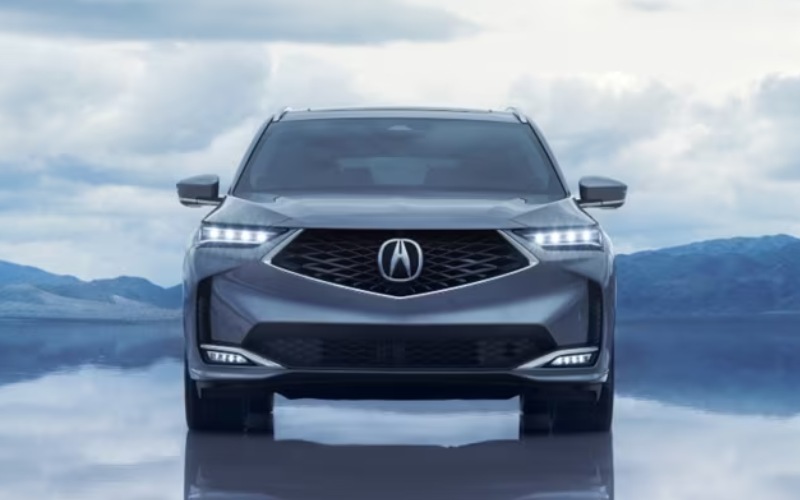
Acura of Avon - Why Google built-in Makes the 2026 Acura MDX a Smarter Fit for Plainville, CT Drivers
Modern luxury SUV shoppers want more than a comfortable seat and a strong engine. Connectivity has become part of the ownership experience, especially for drivers who juggle commuting, family schedules, appointments, playlists, navigation, and hands-free communication throughout the day. That is where Google built-in* in the MDX becomes especially meaningful. Rather than feeling like a separate device connected to the vehicle, the system is integrated into the driving experience, allowing familiar tools such as Google Assistant, Google Maps, Google Play, and more to work directly through the vehicle interface. For Plainville-area drivers who frequently move between local errands, I-84 connections, Route 72 travel, school activities, and regional business stops, this kind of built-in convenience can make the cabin feel calmer and more organized.
The appeal is not just that the MDX has advanced technology. The real advantage is how naturally that technology supports the driver. The 12.3-in color touchscreen is the widest screen ever featured in an Acura, and it displays navigation, music, vehicle settings, and camera views with clear visual detail. Combined with the 12.3-in HD Precision Cockpit™ digital instrument cluster, the MDX gives the driver a more streamlined way to see important information without feeling overloaded. Google built-in* helps reduce the need to reach for a phone, switch between devices, or rely on clunky third-party workarounds. In a three-row premium SUV designed for busy households and professionals, that ease of use matters every time the day gets full.
What Does Google built-in Do in the MDX?
Google built-in* brings familiar Google functionality directly into the MDX, making it easier to navigate, communicate, control select cabin functions, and access compatible apps. With Google Assistant, you can use natural voice prompts for tasks that would otherwise take attention away from the road. A simple voice command can help start navigation, find a destination, adjust music, or control cabin temperature. Google Maps can provide route guidance through the vehicle’s display, which is helpful when driving to an unfamiliar restaurant in West Hartford, checking traffic toward Hartford, or planning a route to a sports complex in another part of Connecticut.
What makes this feature feel premium is the way it fits into the larger Acura cabin experience. The MDX is not simply a technology showcase; it is a performance-focused, family-capable SUV with seating for up to 7, an available Bang & Olufsen® premium sound system, standard wireless charging, and wireless Apple CarPlay® compatibility and wireless Android Auto™ compatibility. Google built-in* complements those features by making the MDX feel more personal and responsive. Instead of learning an unfamiliar system from scratch, many drivers can use tools already familiar from daily life, now presented through an Acura interface that is designed around the vehicle.
Why This Matters for Everyday Driving Around Plainville
Plainville, CT drivers often need a vehicle that can shift roles quickly. One trip may involve a quiet commute, the next may include passengers in all three rows, and another may require cargo space for sports gear, work materials, or shopping bags. In those changing situations, fast and simple technology helps keep the day moving. If a meeting location changes, Google Maps can help update the route. If passengers want a different playlist, the audio can be adjusted without unnecessary distraction. If the cabin needs a temperature change, Google Assistant can help with a voice command. These are small moments, but together they create a more polished ownership experience.
The MDX also supports connected driving beyond Google built-in*. AcuraLink® Connected Services* can help owners stay connected to the vehicle through a smart phone, with features such as Remote Start, Find My Car, Automatic Collision Notification, and Enhanced Roadside Service during the complimentary trial period. Wi-Fi Hotspot Capability* can support passengers who need to stream or stay connected, while charging ports across multiple rows help keep devices powered. For families with teens, professionals carrying work devices, or anyone who spends meaningful time in the vehicle, the MDX cabin is designed to function like a well-equipped mobile command center.
How the Touchscreen and Digital Displays Improve the Experience
The 12.3-in color touchscreen plays a major role in making Google built-in* feel useful rather than merely impressive on paper. Its wide format helps navigation maps, audio menus, and vehicle information feel easier to read at a glance. The interface flows naturally with the dashboard, giving the cabin a clean, modern appearance while keeping key controls accessible. The multi-view rear camera also displays through the screen, adding another layer of confidence when backing out of a driveway, navigating a busy parking area, or lining up in tighter spaces.
On select packages, the available 10.5-in Head-Up Display adds another layer of convenience by projecting key information such as speed, AcuraWatch™ alerts, turn-by-turn navigation, and music information onto the windshield. For drivers who want to stay focused ahead, this feature pairs especially well with integrated navigation. The Precision Cockpit™ digital instrument cluster can also be configured to suit the drive, making the MDX feel tailored rather than generic. Together, these systems show Acura’s balanced approach: advanced technology should inform, assist, and simplify without overwhelming the person behind the wheel.
Connected Technology Works Best with a Premium Cabin
The MDX cabin gives Google built-in* a luxury environment worthy of the feature. Available premium leather-trimmed seating, available authentic open-pore wood accents, and available Iconic Drive™ Ambient Cabin Lighting create an upscale space, while the wide panoramic moonroof adds openness for every row. The removable 2nd-row center seat makes access to the third row easier, and the flexible cargo area helps the MDX adapt from passenger duty to gear hauling without fuss. Technology is most useful when the vehicle around it is equally practical, and the MDX delivers that combination with confidence.
- Navigation confidence: Google Maps helps simplify unfamiliar routes, traffic changes, and destination searches through the vehicle interface.
- Voice control convenience: Google Assistant can help with music, navigation, cabin temperature, and select compatible functions.
- Passenger support: Wi-Fi Hotspot Capability* and multiple charging ports help keep devices ready across the cabin.
- Premium visibility: The 12.3-in color touchscreen and available Head-Up Display make key information easier to access.
- Everyday flexibility: Connected tech pairs with three-row seating and generous cargo space for family, business, and travel needs.
How Google built-in Supports Safety-Minded Driving
While no technology replaces attentive driving, intuitive connectivity can help reduce unnecessary distractions. Being able to ask for directions, change music, or search for a destination by voice may help keep hands on the wheel and eyes closer to the road. The MDX also includes AcuraWatch™ safety and driver-assistive technologies, including Collision Mitigation Braking System™ (CMBS™)*, Road Departure Mitigation (RDM)*, Adaptive Cruise Control (ACC) with Low-Speed Follow*, Lane Keeping Assist System (LKAS)*, Traffic Jam Assist*, Traffic Sign Recognition*, and Blind Spot Information System. These systems contribute to a more confident drive, especially during routine commuting and busier traffic periods.
For shoppers comparing luxury SUVs, the difference often comes down to how features feel in real use. A long list of technology can look impressive, but the best systems become valuable because drivers use them every day. Google built-in* in the MDX has that practical quality. It supports navigation, voice assistance, entertainment, and cabin control in a familiar format, while the vehicle itself provides the power, space, and refinement expected from a premium Acura SUV. That balance is what makes the MDX compelling for drivers who want technology that feels helpful rather than complicated.
Frequently Asked Questions:
Is Google built-in standard on the MDX?
Google built-in* is listed as standard on all MDX packages, bringing familiar Google functionality directly into the vehicle for navigation, voice assistance, compatible apps, and more.
Does the MDX still support Apple CarPlay® and Android Auto™?
Yes. The MDX includes wireless Apple CarPlay® compatibility and wireless Android Auto™ compatibility, giving drivers flexibility based on preferred smartphone ecosystems.
Can passengers stay connected in the MDX?
Yes. The MDX offers Wi-Fi Hotspot Capability*, wireless charging, and multiple USB charging ports across rows, making it easier for passengers to keep devices powered and connected.
Where can local shoppers learn more?
Acura of Avon, serving New Britain, West Hartford, and Plainville, can walk shoppers through MDX technology in person and help compare packages based on driving habits and feature preferences.